Using your receipts
Splitting a bill six ways, without the group-chat arithmetic
Six people, one bill, and the moment the plates are cleared somebody photographs the slip and says “I'll work it out later”. Later is a group chat, three days, two people who have forgotten, and one person quietly absorbing the difference because chasing it is more awkward than paying it.
Dividing by six is the wrong answer
It is the easy answer, which is why it wins. It is also wrong in a way everyone at the table can feel: one person had the ribeye at HK$288 and someone else had the soup at HK$68. Two of you shared the wine. Four of you split the tiramisu. And the 10% service fee has to land on all of it, proportionally, or the person who ordered least ends up subsidising the person who ordered most.
Doing that properly needs the itemised bill, which is the thing that just went into somebody's pocket as a fading slip of thermal paper.
The receipt already knows
A Loop receipt arrives itemised, so the arithmetic has everything it needs the moment the sale closes. Open it, tap Split, mark who had what — anything more than one person shared gets divided across the people who actually had it — and every share comes out with the reasoning attached rather than as a single number you are asked to trust.
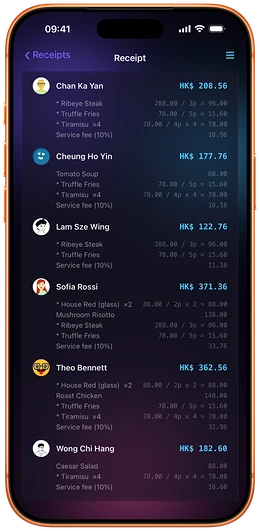
Look at what the ribeye does: 288.00 / 3p = 96.00, appearing on the three people who shared it, and nowhere else. The tiramisu was ordered four times and split four ways. Sofia's soup is hers alone. Everybody's service fee is calculated on their own subtotal. Nobody has to accept a number on faith, because the working is right there next to it — which is the actual reason bill-splitting arguments happen, and the reason they stop.
Friends, without swapping phone numbers
To put names on the split you need the people, and Loop does that with a Loop Tag rather than a phone number: a short code you can read out, or a QR code somebody scans across the table. No contact upload, no giving your number to a group of colleagues you have known for a week.
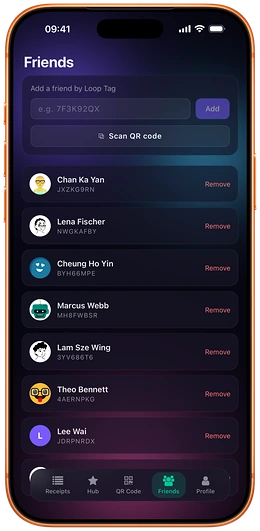
Once someone is a friend, a receipt you share with them appears under Shared with Me in their own receipts list, sitting alongside their own. They get the itemised detail of the meal they were at — not a screenshot, not a number in a chat window — and it stays searchable months later when somebody wonders what that Tuesday actually cost.
What this costs
Nothing. Loop CheckOut is free for shoppers, permanently: no premium tier, no subscription, and no charge for storing, splitting, sharing or exporting your own receipts. The merchant pays for the point of sale tools they use; you do not pay to have a receipt.
Two honest caveats. Splitting works off a Loop receipt, so the shop has to have issued one — if you were handed a guest receipt without an account, it is not tied to your history and cannot be split. And sharing a receipt shares that receipt: the people you split with see the items on it. Which is normally the entire point, but it is worth knowing before you split the bill for the surprise party.
If you are on the other side of the counter and wondering what issuing these looks like, that is the POS guide.
Split the bill from the receipt itself
Loop CheckOut is free, and there is nothing to sign up for at the counter. The itemised receipt arrives on your phone, and the split works from what was actually ordered.


Start free, and see it at your own counter
Starter is free forever, not a trial. Tell us what you sell and what you run at the counter today, and we will get you set up.