POS system · Hong Kong
The counter that hands the receipt over
Loop CheckOut is a cloud point of sale built for Hong Kong shops: a sell screen, a catalog, itemised digital receipts that reach the customer's phone at the counter, loyalty, and an offline mode that keeps the queue moving when the connection does not. Starter is free forever and runs on an iPad you already own.
A POS system for Hong Kong shops
Most point of sale systems in Hong Kong are sold as a box. A terminal arrives, an installer visits, a contract starts, and a printer begins eating thermal rolls at the rate of one every few days. Loop CheckOut is the software half only. It runs on an iPad, there is no hardware to buy, no setup fee and no lock-in contract — and the receipt at the end of it goes to the customer's phone instead of into the bin beside your door.
That last part is the difference. A counter records a sale. Loop records the sale and hands the customer something they keep: an itemised receipt with every line, the payment method, the date, your shop's name and an order number, sitting in an app they can search months later. For you it is a transaction. For them it is a warranty, an expense claim, and a reason to come back.
What is in the free plan
Starter is free forever, and it is not a trial that expires into a sales call. It covers the parts of a counter a small shop actually needs on day one:
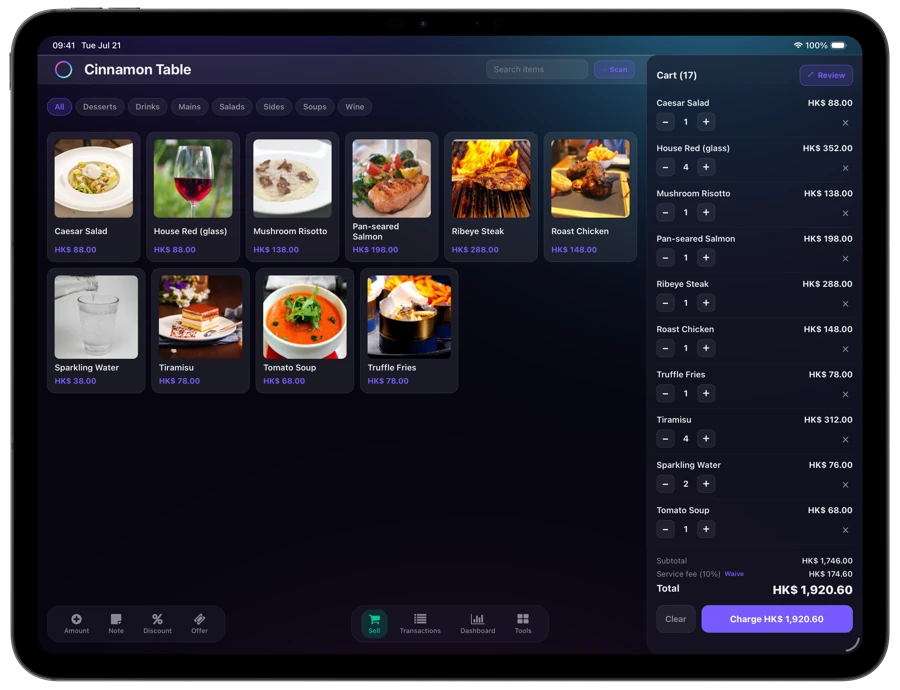
Sell screen
Catalog on the left, running bill on the right. Photos, categories, search, custom-amount lines, quantity steppers and per-line notes.
Digital receipts
Itemised and delivered to the customer's phone as the sale closes. Immutable, with voids recorded against a reason and a person rather than deleted.
Guest receipts
For customers without the app. They open it from a link or an on-screen code with nothing to install. Included on every plan, free one included.
Offline mode
Sales are saved on the device and sync when you are back, receipts included. A dead spot delays a receipt; it never loses a sale.
One loyalty program
A stamp card that fills itself from the receipt, so there is no second scan and nothing for the customer to carry.
Cash and change
A change calculator at the payment step, alongside Octopus, FPS, PayMe, AlipayHK, WeChat Pay and cards as recorded methods.
Inventory and offers start on Growth. Membership points, customer profiles, advanced reporting and marketing campaigns start on Pro. The full breakdown, with prices, is on the pricing page.
What to check before you choose any POS in Hong Kong
These are the questions worth asking every vendor on your shortlist, not only this one. Our answers are in the third column so you can hold them to the same standard.
| Ask | Why it matters | Loop CheckOut |
|---|---|---|
| What hardware must I buy? | Terminal and printer costs are where a “cheap” plan stops being cheap. | None. It runs on an iPad you already own. The optional customer-facing QR display is a separate subscription and the hardware stays ours. |
| Does it handle Octopus, FPS, PayMe, AlipayHK and WeChat Pay? | In Hong Kong this is the first filter, and vendors answer it loosely. | Loop records all of them as the payment method on the receipt. It does not process the payment — you keep the terminal or reader you already use. |
| What happens when the internet drops mid-service? | A counter that stops selling during a lunch rush costs more than the subscription. | Offline mode on every plan, Starter included. Sales are saved locally and sync, receipts delivered, once you are back. |
| Is there a setup fee, an installer visit, or a contract? | These rarely appear on the pricing page. | None of the three. Upgrade, downgrade or cancel whenever; annual billing is charged upfront at half the monthly rate. |
| What exactly is free, and for how long? | “Free” is usually a 14-day trial wearing a disguise. | Starter is free forever, with no customer or receipt cap. |
| Does the customer get a real itemised receipt? | A total on a screen is not a receipt when they need to claim a warranty. | Every line item, price, payment method, date, merchant and order number — in the app, or as a guest receipt for anyone without it. |
| Where does my data live, and can I take it with me? | The answer tells you what leaving costs. | Stored in Asia and governed by Hong Kong's PDPO. Your transaction data is yours and exports for your accountant. |
| Can I keep the POS I already have? | Ripping out a POS that already works to gain one feature is rarely worth it. | Yes. Forward receipts by email from almost any system and your customers still get them digitally. |
Pricing, in one line
Starter free forever; paid plans from HK$267 per month on annual billing. No commission on ordinary sales — the only commission is on marketing campaigns, and only on sales a customer completed after redeeming one of your offers. The full scale is on the pricing page, and the common questions are answered in the merchant FAQ.
If you are weighing the cost of staying on paper, we built a calculator for that on the merchants page, and wrote up the arithmetic in what thermal paper actually costs a Hong Kong café.
Start free, and see it at your own counter
Starter is free forever, not a trial. Tell us what you sell and what you run at the counter today, and we will get you set up.